Table of contents
Related resources



Dynamic Application Security Testing: DAST Basics

Dynamic Application Security Testing (DAST) evaluates your application from the outside. It simulates real attacks on a running system to uncover vulnerabilities that only appear at runtime. Unlike code analysis, DAST finds exploitable flaws such as injection attacks, misconfigurations, and authentication gaps. These issues are commonly cited in OWASP’s Top Ten, making DAST an essential real-world check on your app’s security posture and its exposure to common cyber threats.
This article is part of a series of articles about Application Security testing.
What is DAST?
DAST is a security tool that attempts to penetrate an application from the outside by checking its exposed interfaces for vulnerabilities and flaws. Sometimes called a web application vulnerability scanner, it is a type of black-box security test. It looks for security vulnerabilities by simulating external attacks on an application while the application is running.
The dynamic part of DAST’s name comes from the test being performed in a dynamic environment. Unlike SAST, which scans an application’s code line by line when the application is at rest, DAST testing is executed while the application is running. Testing is typically carried out in a QA or staging environment, although DAST can also be used against production applications when appropriate safeguards are in place.
Because DAST approaches the application from an attacker’s perspective, it can expose runtime weaknesses that static analysis may not reveal. It is particularly useful for assessing externally accessible application behavior, authentication flows, session handling, and other issues that only become visible during execution.
Why is DAST important?
DAST has become an important part of application security strategies for several reasons:
- Identifies real-world vulnerabilities that attackers could exploit once an application is live, helping teams understand their overall security risk.
- Discovers security issues without access to the source code. This makes DAST valuable for testing proprietary or third-party applications where source code is unavailable. It also enables organizations to perform an external security of applications built by external vendors.
- Enables early detection of potential vulnerabilities, helping organizations reduce the risk of breaches, data leaks, and compliance violations. Early detection can also save significant costs, making it possible to fix vulnerabilities earlier in the SDLC.
- Complements other security tests like SAST and penetration testing. While each method has its strengths, using DAST as part of a layered security approach ensures a broader coverage of potential risks across the application’s lifecycle.
How does DAST work?
DAST begins by crawling a running application to identify pages, forms, APIs, and other exposed interfaces. It then sends normal and malicious inputs through those entry points, using techniques such as fuzzing to observe how the application responds. Modern tools can also maintain authenticated sessions and automate multi-step workflows, allowing security tests to reach functionality that would otherwise remain hidden behind login or navigation flows.
Because DAST has no access to an application’s source code, it detects vulnerabilities by observing the application externally rather than examining the code that produced the behavior. This means DAST can verify that a weakness is visible in the running application, but it generally cannot point developers directly to the specific line of source code responsible.
Security expertise can still be important when implementing DAST. Teams may need to configure authentication, define workflows, tune scan settings, or investigate unusual findings. While automation handles much of the repetitive scanning, manual testing can complement DAST when applications contain complex business logic or interactions that automated scanners cannot fully understand.
Though they may sound similar, DAST differs from penetration testing (or pen testing) in several important ways. DAST offers systematic testing focused on the application in a running state. Pen testing, on the other hand, uses common hacking techniques with the owner’s permission and attempts to exploit vulnerabilities beyond just the application, including firewalls, ports, routers, and servers.
What vulnerabilities can DAST detect?
DAST is most effective at identifying weaknesses that become visible when an application processes real requests, user sessions, and external interactions. Common examples include:
- Injection vulnerabilities: Detect SQL injection, command injection, and similar flaws caused by unsafe handling of user-controlled input.
- Cross-site scripting (XSS): Identify inputs that allow malicious scripts to execute in a user’s browser.
- Authentication and authorization weaknesses: Uncover login flaws, broken access controls, privilege escalation, and paths that could enable unauthorized access.
- Session management flaws: Identify insecure cookies, tokens, or session behavior that could expose accounts to hijacking or misuse.
- Input validation issues: Detect cases where malformed or malicious data produces unexpected application behavior or exposes potential vulnerabilities.
- Security misconfigurations: Identify externally visible configuration problems, exposed functionality, missing security headers, and other weaknesses that may increase security risk.
- Sensitive data exposure: Test whether application responses, error messages, or accessible endpoints inadvertently reveal sensitive data to unauthorized users.
Because these weaknesses appear in a running application, DAST provides a useful view of which security issues could be exposed to real attackers. However, it works best as part of a broader application security testing strategy rather than as a standalone solution.
The evolution of DAST technology
DAST has evolved alongside changes in the way applications are built and deployed. While early scanners primarily targeted traditional web applications, newer tools are designed to test dynamic interfaces, APIs, complex authentication flows, and modern application architectures.
Legacy DAST
Legacy DAST tools are traditional web vulnerability scanners designed primarily to test classic web applications built with simple, server-rendered HTML. They operate by crawling application pages and injecting a broad set of predefined attacks to detect vulnerabilities. These tools typically focus on known vulnerabilities such as SQL injection, cross-site scripting (XSS), and outdated server configurations.
However, legacy DAST tools have limitations when testing modern applications. They struggle with dynamic content, complex authentication workflows, API endpoints, and client-side rendering frameworks like React or Angular. Their scanning methods often miss vulnerabilities that are hidden behind multi-step user interactions, dynamic fields, or asynchronous communications (e.g., AJAX requests).
Modern DAST
Modern DAST tools have evolved to address the complexities of contemporary application architectures. They are designed to handle single-page applications (SPAs), APIs, microservices, and environments built using infrastructure as code tools, as well as applications that rely heavily on JavaScript for client-side rendering. This makes modern DAST particularly useful for web app and API security testing, where dynamic behavior and complex request flows can make vulnerabilities difficult to detect using older scanners.
Modern DAST tools often include features like API scanning, headless browser crawling, machine learning to optimize attack patterns, and integration capabilities with CI/CD pipelines for continuous security testing. Strong API security support is especially important as applications increasingly expose functionality through REST and GraphQL endpoints.
DAST can also complement mobile application security testing by assessing the APIs and backend services that mobile apps rely on, although it does not replace testing of the mobile application itself. For organizations running workloads across public and private infrastructure, DAST can also support broader cloud security efforts by testing externally accessible applications and services for runtime weaknesses.
DAST vs. SAST vs. IAST vs. SCA
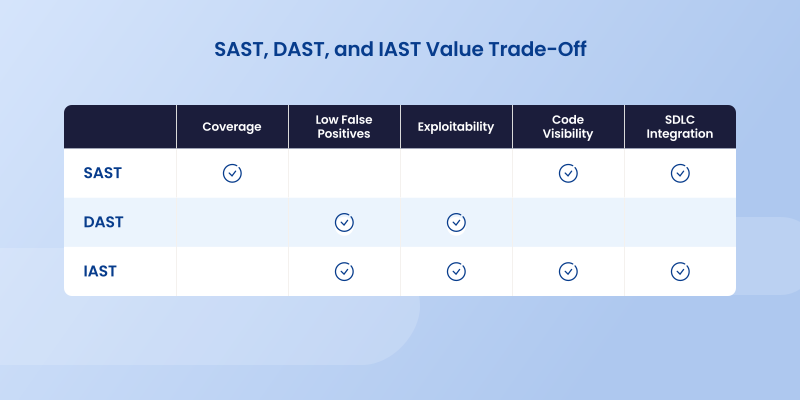
Understanding where each approach operates and what it can detect helps security teams combine them for more comprehensive application coverage. Let’s see how DAST compares to related application security categories:
- Dynamic application security testing (DAST) is a type of black-box security testing in which tests are performed by attacking an application from the outside.
- Static application security testing (SAST) is white-box testing that analyzes source code from the inside while components are at rest.
- Interactive application security testing (IAST) works from within an application through instrumentation of the code to detect and report issues while the application is running, often considered a form of gray-box testing since it combines internal and external perspectives. For runtime protection that complements DAST and IAST, organizations can also explore runtime application self-protection (RASP) , which actively defends applications while they execute.
- Software composition analysis (SCA) scans your code base to provide visibility into open source software components, including license compliance and security vulnerabilities.
Each type of AST tool focuses on a slightly different aspect of application security . Combining these security tools gives teams broader visibility because each approach identifies different classes of weaknesses across code, dependencies, and runtime behavior.
DAST pros and cons
DAST is a valuable testing tool that can uncover security vulnerabilities other tools can’t. Though DAST excels in certain areas, it does have its limitations. Let’s look at the top pros and cons of this technology. It is worth noting that some of these limitations are mitigated by next-generation DAST technology.
Pros
DAST provides several advantages for teams that need to evaluate the security of running applications from an attacker’s perspective. Its outside-in approach is particularly useful for validating vulnerabilities that are actually exposed at runtime.
- Technology independent Because DAST doesn’t look at source code, it is not language or platform specific. Not being limited to specific languages or technologies allows you to run one DAST tool on all your applications.
- Low false positives Based on OWASP’s Benchmark Project, DAST has a lower false positive rate than other application security testing tools. Testers can zero in on real vulnerabilities while tuning out the noise.
- Identifies configuration issues DAST excels at finding security vulnerabilities that occur only when the application is operational. In addition, DAST attacks an application from the outside in, placing it in the perfect position to find configuration mistakes missed by other AST tools.
Cons
The same black-box approach that gives DAST its runtime perspective also creates some limitations. Teams should account for these gaps when deciding how DAST fits into a broader application security testing program.
- Not highly scalable One of the main downsides to DAST is its heavy reliance on security experts to write effective tests, which makes it very difficult to scale.
- No code visibility DAST does not have any visibility into an application’s code base. This means DAST can’t point developers to problematic code for remediation or provide comprehensive security coverage on its own.
- Slow scans DAST is not known for its speed, and many users report scans taking too long. Forrester estimates that DAST scans can last as long as 5-7 days. In addition, DAST scans typically find vulnerabilities later in the software development life cycle (SDLC), when they are more costly and time consuming to fix.

DAST tools: open source vs. commercial
Open source DAST tools provide a cost-effective way for organizations to conduct security testing. Popular examples include OWASP ZAP (Zed Attack Proxy) and w3af (Web Application Attack and Audit Framework). These tools offer strong baseline scanning capabilities and are highly customizable, allowing security teams to write their own scripts, plugins, and integrations.
However, open source DAST tools often require significant manual setup, tuning, and ongoing maintenance. They may lack advanced features like sophisticated authentication handling, API scanning, or deep integration with modern development pipelines out of the box. Support is community-based, which can mean slower resolution times for critical issues.
Commercial DAST tools are typically offered by established security vendors and come with a broader feature set. These tools often support modern application architectures, handle complex authentication mechanisms, scan APIs, and offer integration with ticketing systems, CI/CD pipelines, and security orchestration platforms.
Commercial tools usually come with professional support, regular updates, extensive documentation, and detailed reporting capabilities tailored for compliance needs. Many offer machine learning and AI enhancements to improve vulnerability detection and reduce false positives.
| Feature | Open Source DAST Tools | Commercial DAST Tools |
|---|---|---|
| Cost | Free (no license fees) | High (license and support costs) |
| Customization | Highly customizable (requires expertise) | Customizable, usually easier to configure |
| Features | Basic to moderate; limited advanced features | Full feature set, including API scanning, CI/CD integration |
| Support | Community-driven (slower, less reliable) | Professional support with SLAs |
| Ease of Use | Requires manual setup and maintenance | User-friendly, guided setup, regular updates |
| Handling of Modern Apps | Limited, unless heavily customized | Strong support for SPAs, APIs, dynamic content |
| Integration | Manual integration into workflows | Built-in integrations with development and security tools |
| Update Frequency | Depends on community contributions | Regular updates and patches from vendor |
| False Positives Management | Basic (manual effort needed) | Advanced features to reduce false positives |
DAST: One piece of your application security puzzle
In a modern DevOps practice, security and developer teams need testing solutions that help secure applications without slowing down development. In this sense, DAST is a powerful tool. In fact, after SAST, DAST is the second largest segment of the AST market. Forrester’s research reports that 35% of organizations surveyed already use DAST and many more plan to adopt it.
When it comes to application security, however, there is no one tool that can do it all. Though DAST fills an important function in finding potential run-time errors in a dynamic environment, it will never find an error in a line of code. DAST doesn’t provide comprehensive coverage on its own, particularly across all running applications and their underlying code, dependencies, and infrastructure.
For this reason, most organizations need a number of application security testing tools working in concert to effectively reduce their security risks. DAST excels in looking at external attack methods. SAST finds coding errors by scanning the entire code base. Together with an SCA solution to handle your open source software, they provide the comprehensive testing strategy your organization needs.
See runtime vulnerabilities before attackers do. Explore Mend DAST.
About the Author
Tiffany Jennings
Head of Content
Tiffany Jennings is Head of Brand & Content at Mend.io. She oversees editorial strategy and thought leadership across Mend.io’s digital channels, bringing complex AppSec and AI security topics to life through creative storytelling, expert insights, and helping technology find its human voice.
Related Posts
Application Security Testing: Security Scanning and Runtime Protection Tools
Best Application Security Testing Tools: Top 10 Tools in 2026
Best Application Security Testing Providers: Top 8 in 2026
Best application security testing services: top 5 in 2026
Infrastructure as Code: How It Works & Top Tools in 2025
Black Box Testing: What You Need to Know