Table of contents
Related resources


Dependency management tools: Key features and 6 tools to know in 2026

What are dependency management tools?
Dependency management tools are software solutions designed to automate and streamline the process of handling external libraries, modules, or packages that a project relies on. These tools help developers specify, install, update, and track dependencies, ensuring that all required components are present and compatible. By maintaining a centralized record of dependencies, these tools reduce manual intervention and errors, improving the consistency and reliability of software builds across different environments.
These tools have become essential in modern development workflows, where projects often integrate numerous third-party packages. Without proper management, tracking and updating dependencies can quickly become unmanageable, leading to version conflicts, security vulnerabilities, or broken builds. Dependency management tools address these challenges by providing mechanisms for version control, compatibility checks, and security scanning, ensuring that projects remain stable and maintainable as they evolve.
Key features of dependency management tools include:
- Version control and semantic versioning: Allows developers to specify and lock dependency versions using rules like patch, minor, or major releases to prevent unexpected breaking changes.
- Automated updates: Tools automatically scan for newer versions of dependencies and apply updates based on defined project policies to deliver security patches and performance improvements.
- Conflict resolution: Analyzes the dependency tree to automatically resolve version conflicts between libraries or alerts developers to manual intervention points to maintain build stability.
- Security scanning: Automatically checks dependencies against known vulnerability databases, flagging or blocking the use of insecure packages to address security risks early in the development process.
- Integration with CI/CD pipelines: Ensures dependency checks, updates, and security scans are performed consistently within automated build and deployment processes to maintain software quality.
Benefits of using dependency management tools
Dependency management tools do more than organize packages. They introduce structure and automation into how projects handle external code. This reduces risk and makes development workflows more predictable, especially as systems grow in complexity.
- Consistent environments: Dependencies are defined in a single configuration, ensuring all developers and environments use the same versions. This reduces “it works on my machine” issues.
- Automated installation and updates: Tools handle fetching and installing dependencies automatically. Updates can also be managed in a controlled way.
- Version control and conflict resolution: They track exact versions and resolve conflicts between incompatible packages.
- Improved build reproducibility: With lock files or similar mechanisms, builds can be reproduced exactly across different systems and over time.
- Faster onboarding: New developers can set up projects quickly by installing dependencies with a single command instead of manual setup.
- Security management: Many tools integrate vulnerability scanning and alerts, helping teams identify and fix insecure dependencies early.
- Simplified dependency tracking: A centralized list of dependencies makes it easier to audit, review, and maintain third-party code usage.
- Better integration with CI/CD pipelines: Dependency tools work with automated pipelines, ensuring consistent builds and deployments in continuous integration environments.
Related content: Read our guide to dependency management vs dependencies
Key features of dependency management tools
Version control and semantic versioning
Version control is central to dependency management tools, allowing developers to specify and lock dependency versions within their projects. By supporting semantic versioning, these tools help teams define which updates are acceptable, such as patch, minor, or major releases, based on the project’s stability and compatibility requirements. This control prevents unexpected breaking changes from being introduced when dependencies are updated, which is especially important for larger or production-critical applications.
Semantic versioning also provides clarity about the nature of updates. Developers can automatically accept backward-compatible changes while manually reviewing major updates that may introduce incompatibilities. Dependency management tools enforce these rules, helping teams balance the need for up-to-date libraries with maintaining a stable codebase. This approach reduces the risk of introducing bugs due to incompatible dependencies.
Automated updates
Automated update features in dependency management tools save time by scanning for newer versions of dependencies and applying updates as specified by project policies. These tools can be configured to automatically update packages that do not introduce breaking changes or to prompt developers for review when updates require manual intervention.
By regularly applying safe updates, teams can receive security patches, performance improvements, and bug fixes in third-party libraries without disrupting the development workflow. Automated update mechanisms also help prevent technical debt, as dependencies are less likely to become outdated or unsupported.
Learn more in our detailed guide to dependency update
Conflict resolution
Dependency conflicts can occur when different libraries require incompatible versions of the same package. Dependency management tools address this by analyzing the dependency tree and resolving version conflicts automatically, either by selecting compatible versions or by alerting developers to manual intervention points. This conflict resolution process helps maintain build stability, particularly in projects with complex or nested dependencies.
Automated conflict resolution reduces the time developers spend troubleshooting version mismatches and helps avoid runtime errors caused by incompatible libraries. By surfacing potential issues early in the development process, these tools allow teams to address conflicts before release, resulting in more predictable software updates.
Security scanning
Security scanning is a common feature of modern dependency management tools. These tools can automatically check dependencies against known vulnerability databases and flag or block the use of insecure packages. This approach allows teams to address security risks before they reach production.
Security scanning capabilities often include automated alerts, suggested remediations, and automatic patching for vulnerabilities. By integrating security checks into the dependency management workflow, teams can maintain security standards while continuing development work.
Integration with CI/CD pipelines
Integration with CI/CD pipelines enables dependency management tools to operate within automated build and deployment processes. These integrations ensure that dependency checks, updates, and security scans are performed consistently every time code is built, tested, or deployed. This automation reduces the likelihood of human error and helps ensure that the software delivered to users is reliable and secure.
By embedding dependency management into CI/CD workflows, teams can catch issues early, automate remediation, and enforce organizational policies regarding dependency usage. This integration supports continuous delivery practices and helps maintain the overall quality of the software lifecycle.
What manual updates really cost you
The engineering hours, the patch latency, the open risk window. See the model behind 90%+ efficiency gains and build the business case in your own numbers.

Types of dependency management tools
Dependency security and automation tools
Dependency security and automation tools focus on identifying risks and maintaining healthy dependencies throughout the development lifecycle. These tools scan project dependencies for known vulnerabilities, outdated packages, and license issues. They often integrate directly into development environments, source control systems, and CI/CD pipelines.
In addition to detection, these tools automate remediation tasks. This includes generating pull requests for updates, suggesting patches, and prioritizing fixes based on risk. Their main goal is to reduce manual effort while improving security and compliance. They are especially useful in environments where applications rely heavily on open source components.
Traditional package management tools
Traditional package management tools handle the installation, resolution, and version control of dependencies within a project. They allow developers to define required libraries, specify version constraints, and automatically install compatible packages from centralized repositories.
These tools focus on ensuring that projects build consistently across environments. They manage dependency trees, resolve conflicts, and create lock files to guarantee reproducible builds. While they may include some security features, their primary role is dependency organization and environment consistency rather than risk detection.
Using them together
These two categories are not interchangeable and are most effective when used together. Traditional package managers handle the core task of installing and maintaining dependencies, while security and automation tools monitor those dependencies for risks and keep them up to date.
In practice, a package manager defines what gets installed, and a security tool continuously checks whether those dependencies remain safe and current. Integration between the two allows automated updates, vulnerability fixes, and policy enforcement without disrupting development workflows. This combined approach improves both stability and security across the software lifecycle.
Notable dependency management tools
Dependency security and automation tools
1. Mend.io

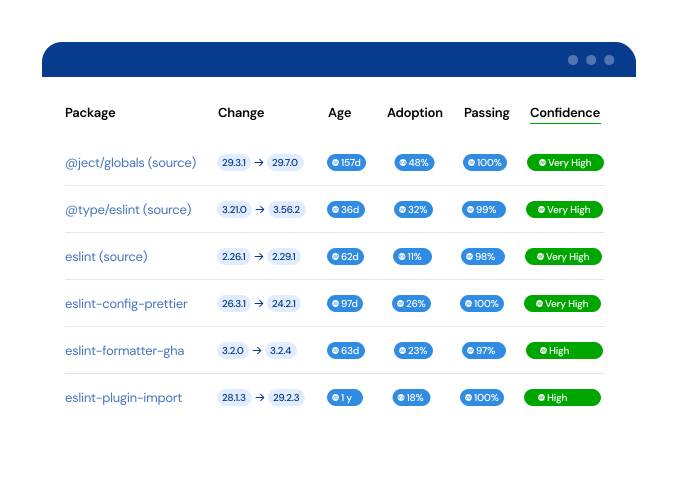
Mend.io provides automated dependency management through Mend Renovate, a family of dependency update tools that automatically keeps package dependencies current and delivers updates as pull requests.. Mend Renovate is available as a free open source CLI, a free hosted Community edition, and a paid Enterprise edition for organizations that need scale, advanced workflows, and dedicated support. Automated dependency management works alongside Mend AppSec's SCA capabilities, turning Mend SCA's prioritized findings into automated fixes, reducing technical debt and closing open source vulnerabilities faster.
Key features include:
- Automatic job scheduling and webhooks: Schedules repository scans at configurable intervals and responds to repository events in real time to trigger update jobs.
- Automated pull requests for dependency updates: Detects outdated packages and opens pull requests with full changelogs, so teams can review what's changing without leaving the PR.
- Merge confidence ratings: Estimates the likelihood of an error-free merge so teams can automatically apply low-risk updates and focus review effort where it matters.
- Merge confidence workflows: Turns confidence ratings into policy — suppress PRs for low-confidence updates, group high-confidence ones, automerge the rest.
- Broad ecosystem support: Works with more than 90 package managers, including npm, Maven, NuGet, pip and Poetry, Go modules, Docker, Terraform, and GitHub Actions.
- Technical debt reduction: Keeps dependencies current continuously, avoiding the large, risky upgrades that come from letting them pile up.
2. Snyk Open Source

Snyk Open Source is a security-focused dependency management tool that helps developers identify, prioritize, and remediate vulnerabilities in open source dependencies across the development lifecycle. It provides software composition analysis by integrating directly into developer environments, source control systems, and CI/CD pipelines.
Key features include:
- In-IDE and CLI vulnerability detection: Scans dependencies while developers write code.
- Pull request scanning: Analyzes incoming changes in pull requests to detect vulnerable or non-compliant dependencies.
- CI/CD pipeline integration: Embeds security checks into automated build and deployment workflows.
- Production environment monitoring: Tests live applications to detect exposure to known vulnerabilities and tracks newly disclosed issues.
- Risk-based prioritization: Assigns a risk score to vulnerabilities using contextual factors such as exploit maturity, reachability, and industry scoring metrics.

Source: Snyk
3. Dependabot

Dependabot is an automated dependency management tool built into GitHub that keeps project dependencies up to date and secure by generating pull requests for outdated or vulnerable packages. It analyzes dependency manifests and configuration files in a repository, then checks for new versions based on semantic versioning.
Key features include:
- Automated version update pull requests: Detects outdated dependencies and creates pull requests to update them to newer versions.
- Automated security updates: Identifies vulnerable dependencies through Dependabot alerts and generates pull requests to upgrade them to the minimum patched version.
- Semantic versioning support: Uses semver rules to determine appropriate updates.
- Configurable behavior via dependabot.yml: Allows teams to define update schedules, target ecosystems, pull request settings, and dependency management rules in a centralized configuration file.
- Dependency manifest and lock file analysis: Scans project files to identify dependencies and determine when updates are required.

Source: Dependabot
Traditional package management tools
4. npm

npm is a dependency management tool and package manager for JavaScript that enables developers to install, manage, and distribute project dependencies through a centralized registry. It combines a command-line interface with access to an online repository of packages, allowing teams to add external libraries and tools to their projects.
npm uses configuration files like package.json to define dependencies and version ranges, and package-lock.json to ensure consistent installations. By automating dependency installation, version control, and distribution, npm simplifies project setup and maintenance in Node.js environments.
Key features include:
- Command-line interface for package management: Provides a CLI tool to install, update, remove, and manage dependencies from the terminal.
- Centralized package registry: Offers access to public and private packages that can be searched, installed, and shared.
- Project-based dependency management: Uses the package.json file to define project dependencies and their acceptable version ranges.
- Semantic versioning support: Allows developers to specify flexible version ranges.
- Lock file for reproducible builds: Generates a package-lock.json file to store exact dependency versions.

Source: npm
5. Maven

Maven is a build automation and dependency management tool primarily used for Java projects that standardizes how applications are built, packaged, and managed. It uses a convention-based approach, where common build steps are predefined and only exceptions require explicit configuration.
Project structure, dependencies, and build settings are defined in an XML file, allowing Maven to automatically download required libraries from remote repositories and manage them locally. By combining build automation with dependency management, Maven simplifies project setup and supports reproducible builds across environments.
Key features include:
- Convention-based project structure: Uses predefined conventions for build processes, reducing the need for extensive configuration.
- XML-based project configuration: Defines dependencies, build steps, plugins, and project metadata in a centralized XML file (pom.xml).
- Automatic dependency resolution: Downloads required libraries and plugins from remote repositories and manages them in a local cache.
- Centralized repository access: Integrates with public and private repositories, such as Maven Central, to retrieve and share project dependencies.
- Local dependency caching: Stores downloaded artifacts locally to improve build performance and enable reuse across projects.
Learn how to update Maven dependencies automatically.
6. Composer

Composer is a dependency management tool for PHP that allows developers to define, install, and update the libraries their projects depend on. It works on a per-project basis, meaning dependencies are installed locally within the project directory rather than globally.
Composer reads a configuration file to determine required packages, resolves compatible versions, including nested dependencies, and installs them automatically. By handling dependency resolution and updates through simple commands, Composer simplifies project setup and ensures consistent environments across development systems.
Key features include:
- Project-based dependency management: Installs and manages dependencies locally within each project, avoiding conflicts between different projects.
- Dependency declaration and resolution: Allows developers to define required libraries, then automatically determines and installs compatible versions, including indirect dependencies.
- One-command installation and updates: Installs all dependencies or updates them to newer versions using simple commands.
- Support for version constraints: Enables specifying version ranges to control updates while maintaining compatibility.
- Local vendor directory: Stores all installed dependencies in a dedicated directory within the project for isolation and consistency.
See our guide to managing PHP dependencies using Composer.

Source: Composer
How to choose a dependency management tool for your project
Choosing a dependency management security and automation tool
When selecting a dependency security and automation tool, focus on how well it reduces manual work while maintaining security and development speed. Tools that automate dependency updates and generate pull requests can significantly simplify maintenance and ensure dependencies stay current:
- Scalability is critical for teams managing many repositories: A suitable tool should handle large environments without performance issues and apply updates consistently across projects. This ensures that dependency management does not become a bottleneck as systems grow.
- It is important to evaluate how the tool communicates risk: Features that estimate the impact of updates, such as confidence ratings, help teams decide which changes to apply automatically and which require review. This reduces the chance of introducing breaking changes while still enabling continuous updates.
- Integration with existing workflows is another key factor: Tools should work directly within repositories and CI/CD pipelines, allowing developers to manage updates through familiar processes like pull requests. This minimizes disruption and improves adoption.
- Consider how the tool supports broader goals such as security, compliance, and technical debt reduction: Solutions that provide fast feedback on vulnerabilities and policy issues, while keeping dependencies up to date, help teams maintain a stable and secure codebase over time.
Choosing a package manager
When selecting a package manager, the primary focus should be compatibility with your programming language and ecosystem. Most languages have established tools that are tightly integrated with their build systems and community practices. Choosing a widely adopted package manager ensures better support, documentation, and access to maintained libraries.
Additional factors to look out for include:
- Performance and reliability: A good package manager should resolve dependencies quickly, handle large dependency trees efficiently, and ensure consistent installations across environments. Features such as lock files and deterministic builds are critical for maintaining reproducibility in both development and production systems.
- How the tool handles versioning and conflict resolution: Support for semantic versioning, flexible version constraints, and clear dependency trees helps prevent compatibility issues. Tools that provide transparent resolution mechanisms make it easier to debug and maintain complex projects.
- Integration with development workflows: The package manager should work smoothly with CI/CD pipelines, containerized environments, and build automation tools. This ensures that dependency installation and updates remain consistent across all stages of the software lifecycle.
Conclusion
Dependency management tools are a core part of modern software development, enabling teams to manage complexity, maintain stability, and reduce security risks as projects grow. By combining structured dependency control with automation and continuous monitoring, these tools help ensure consistent builds and faster development cycles. Selecting the right combination of tools and integrating them into existing workflows allows organizations to maintain reliable, secure, and scalable applications over time.