Table of contents
Related resources


AI code review tools: Key benefits and 8 tools to know in 2026

What are AI code review tools
AI-powered code review tools analyze source code to identify potential issues, such as bugs, security vulnerabilities, and performance bottlenecks, before they reach production. These tools scan codebases, pull requests, and commits, offering suggestions for improvements and flagging areas needing attention. It’s important to note that AI coding assistants like GitHub Copilot and OpenAI Codex are not AI code review tools, although they are commonly used for this purpose.
These tools integrate into development environments and continuous integration pipelines, making code reviews faster and less error-prone. With the rising complexity and speed of software development, AI code review tools help teams keep up with changing standards, identify hidden flaws, and maintain high code quality.
With the surge of AI-first IDE tools like Cursor, automating the code review process is even more important, because human code reviewers cannot match the pace of AI-generated code, and find it challenging to do code review on AI-generated code.
Considerations for choosing AI code review tools include:
- Integration: Ensure the tool integrates seamlessly with your existing development workflow and tools (IDEs, Git platforms, etc.).
- Specific needs: Consider the types of issues you need help with (security, performance, maintainability) and choose a tool that excels in those areas.
- Cost: Some tools are free, while others have subscription models based on usage or features.
- Learning curve: Understand how long it will take for you and your team to start effectively using the code review tool.
- Code focus: Determine if reviews concentrate on critical sections of code where performance matters, or on routine glue code.
- Developer trust: Consider the team’s confidence in AI-driven review feedback. If trust is low, prioritize tools that explain recommendations clearly.
- Noise reduction: Choose tools that can adapt to your team’s coding style over time.
- Workflow compatibility: Verify the tool can slot into your current review process without requiring major changes to your development workflow.
- Domain-specific rules: Look for tools that allow you to define custom rules to catch issues specific to your product’s security requirements or business domain.
This is part of a series of articles about AI security.
Key benefits of AI code review tools
AI code review tools provide several advantages that improve software quality. By automating and augmenting code analysis, these tools help teams deliver better code more efficiently. Here are some key benefits:
- Enhanced code quality: AI tools detect issues related to logic, readability, security, and maintainability. They go beyond syntax checks to provide context-aware recommendations, helping developers write cleaner, more reliable code.
- Increased efficiency: Automated reviews save time by reducing the manual effort involved in code inspection. Teams can focus on critical logic and design decisions while the tool handles routine checks.
- Faster feedback: Instant feedback during development or CI runs helps catch errors early. Developers don’t have to wait for peer reviews to identify basic issues, accelerating the feedback loop.
- Improved consistency: AI enforces coding standards uniformly across the codebase, minimizing variations in style and structure. This leads to a more maintainable and coherent codebase.
- Reduced risk: By catching security flaws and potential bugs early, AI tools lower the chances of production issues. They help ensure that code adheres to best practices and complies with industry standards.
Advanced code review tools provide the following additional benefits:
- Semantic error detection: Identify logical flaws that traditional linters cannot, such as incorrect iteration patterns, missing edge cases, or flawed conditional logic.
- Test coverage feedback: Suggests missing test cases by analyzing changes in code behavior or input handling, improving test completeness.
- Risk-based prioritization: Integrates with security review tools to flag vulnerabilities and weaknesses, helping teams focus on high-impact issues first.
- Contextual review: Poses targeted questions in pull requests to prompt deeper consideration of design choices and guide developers toward better solutions.
- Foundation for governance: Reviews code against organizational policies for security, performance, and documentation, supporting long-term compliance and maintainability.
Notable AI code review tools
1. Mend.io
Main focus: End-to-end Application Security review tool integrated into the SDLC
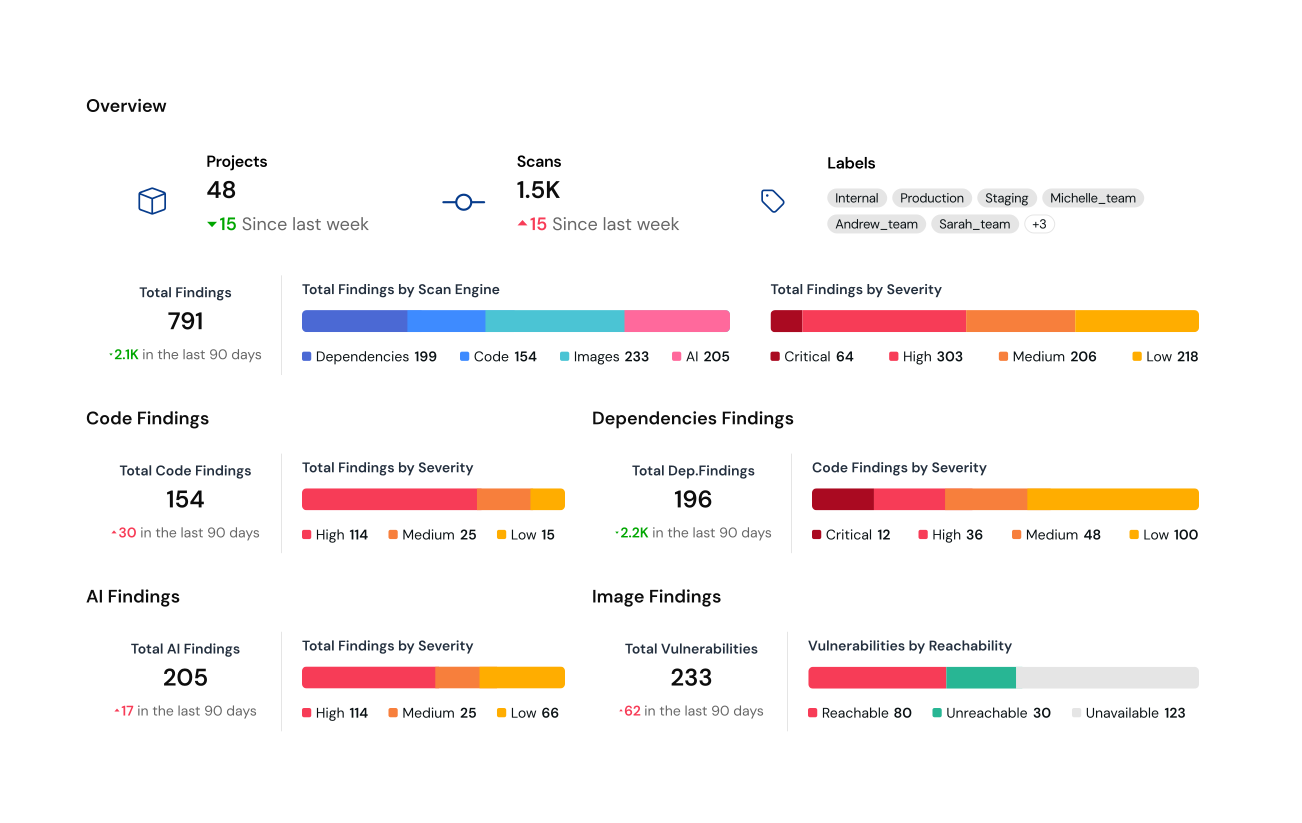
Mend.io is an AI application security platform that brings security into every code review. It analyzes source code and open-source dependencies to uncover vulnerabilities, logic flaws, and license risks, while also detecting issues unique to AI-generated code. Mend.io goes beyond syntax and style checks by applying deep security analysis, dependency governance, and AI risk protection directly in pull requests and CI/CD pipelines. This ensures teams catch security and quality issues early, enforce policies automatically, and ship safer code without slowing down development.
Key features include:
- AI-first IDE integration: Integrates with popular co-pilot to fix detected issues automatically.
- Dependency risk analysis: Identifies and remediates open-source vulnerabilities and license issues.
- SAST tuned for GenAI code: Detects unique weaknesses in AI-generated code.
- Automated remediation: Suggests safe fixes and dependency updates developers can apply instantly.
2. SonarQube
Main focus: Quality gates and governance
SonarQube is a static analysis and code review tool to improve code quality, enforce security standards, and simplify development workflows. By automating the review process and integrating with CI/CD pipelines and IDEs, SonarQube provides developers with immediate feedback on code issues.
Key features include:
- Automated code analysis: Performs static analysis on every code change, identifying bugs, vulnerabilities, and maintainability issues across multiple languages.
- Real-time feedback: Delivers instant insights within IDEs and pull requests.
- Security compliance: Supports industry standards such as OWASP Top 10, CWE Top 25, and PCI DSS.
- CI/CD integration: Runs scans automatically during builds, branches, and pull requests in CI/CD pipelines, ensuring code meets quality gates before merging.
- Reporting: Provides dashboards and metrics to monitor code health, track trends, and support data-driven decision-making.

Source: SonarQube
3. CodeRabbit
Main focus: Conversational AI for pull requests
CodeRabbit is an AI-powered code review platform that helps development teams accelerate their workflows by automating line-by-line reviews in pull requests and IDEs. Designed for GitHub, GitLab, and Azure DevOps, it combines static analysis tools, configurable AI review logic, and user feedback learning to catch bugs and improve code quality.
Key features include:
- Line-by-line AI reviews: Analyzes each line of code with awareness of the broader codebase, catching subtle issues.
- Configurable review behavior: Lets teams customize review style and depth using feedback loops and configurable instructions.
- Code change summaries: Automatically generates one-line descriptions of file changes and concise PR summaries.
- Integrated chat agent: Offers conversational assistance for writing code, resolving comments, generating docstrings, and managing tasks.
- Signal-focused analysis: Combines static analyzers, linters, security tools, and generative AI with code graph context.
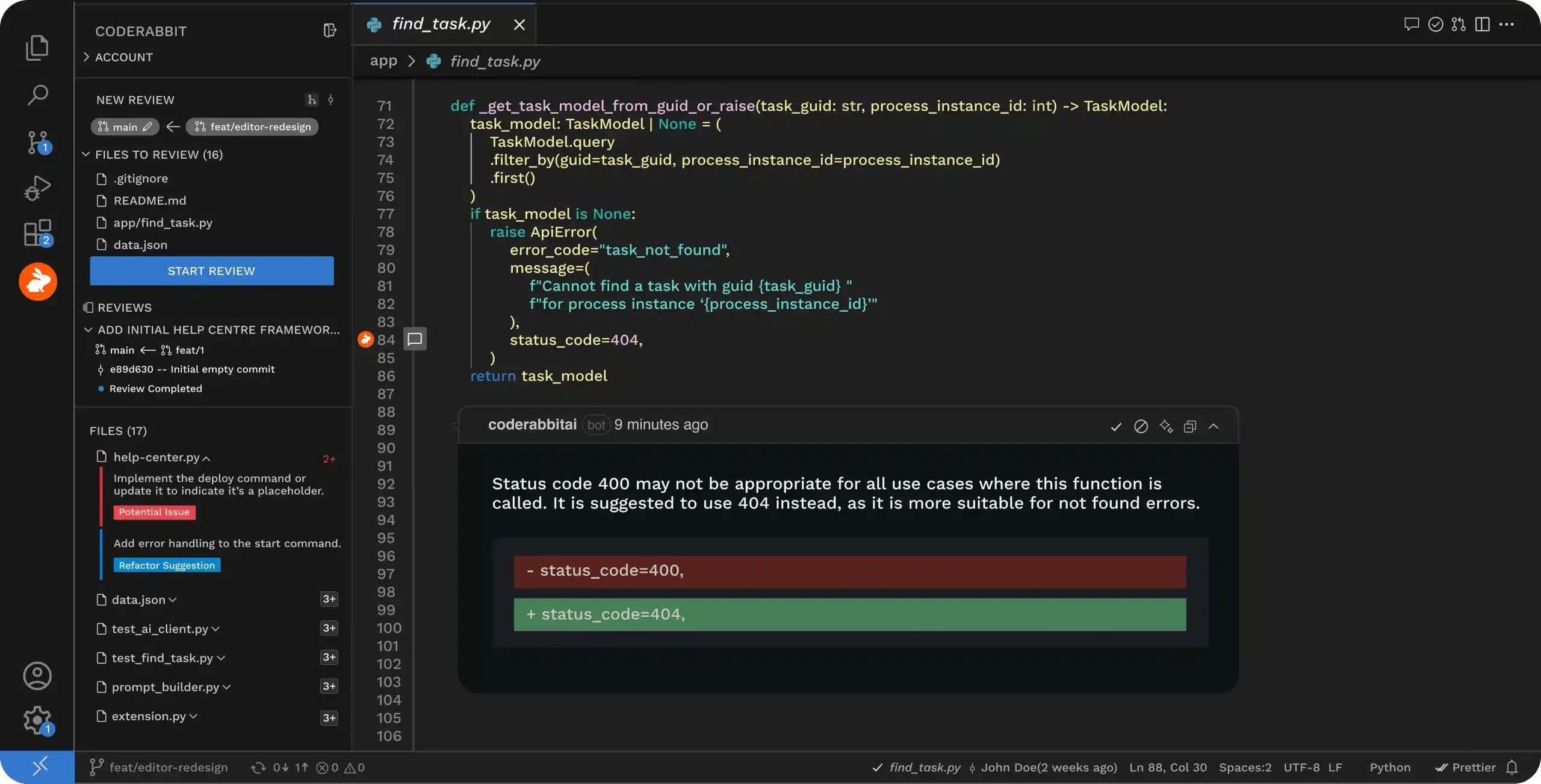
Source: CodeRabbit
4. CodeScene
Main focus: Behavioral code analysis and hotspots
CodeScene is an AI-augmented code review tool focused on maintaining and improving code health by preventing technical debt. It automates pull request reviews using customizable quality gates aligned with team goals, ensuring that only adequate code is merged.
Key features include:
- Automated code health checks: Reviews every pull request against defined Code Health rules to ensure new code maintains or improves overall quality.
- Technical debt detection: Identifies early signs of code degradation, allowing teams to address debt before it accumulates and affects long-term maintainability.
- Configurable quality profiles: Choose from built-in review strategies like “Pay Down Technical Debt” or “Clean Code Collective,” or create custom profiles tailored to the team’s goals.
- Context-aware review gates: Adjust quality bars by repository section, team, or project scope to reflect real-world responsibilities and risk levels.
- Trend monitoring: Tracks the evolution of code health and developer adoption across sprints, visualizing the effects of each pull request on code maintainability.
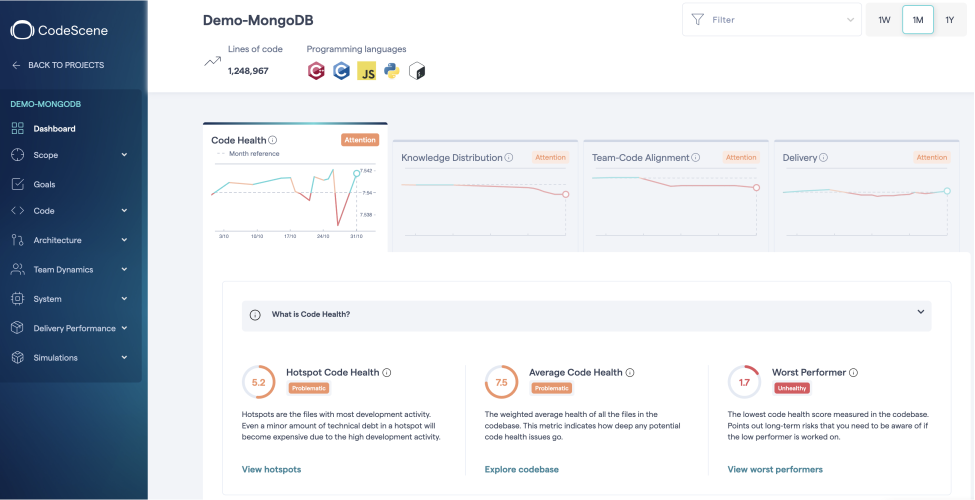
Source: CodeScene
5. DeepCode
Main focus: Security centric pull request insights
DeepCode, the AI engine behind Snyk’s security platform, helps secure applications by identifying and fixing vulnerabilities. Unlike general-purpose AI, DeepCode uses multiple security-trained models, curated data from verified open source fixes, and hybrid AI techniques to provide context-aware code analysis and autofixes.
Key features include:
- AI-driven security analysis: Uses a hybrid of symbolic and generative AI to detect, autofix, and prioritize vulnerabilities with precision.
- Fast and accurate autofixes: Supports Snyk’s Agent Fix, delivering developer-ready code patches for common security issues.
- Multi-model security intelligence: Employs several specialized AI models trained on vetted security datasets.
- Data privacy by design: DeepCode is self-hosted and never trains on customer data.
- Risk-based prioritization: Improves vulnerability management by factoring in package popularity, reachability, and exploit maturity to surface the most critical risks first.
Source: Snyk
6. Qodana
Main focus: JetBrains native AI code reviewer
Qodana is a static code analysis platform developed by JetBrains that brings the inspection capabilities of its IDEs into CI pipelines. Designed to help teams deliver clean, maintainable, and secure code, Qodana supports over 2,500 inspections out of the box and integrates with JetBrains IDEs and popular CI tools.
Key features include:
- JetBrains-powered analysis: Leverages the same static analysis engines as JetBrains IDEs to deliver consistent results across local and CI environments.
- IDE and CI integration: Keeps code inspections aligned between the developer’s IDE and the build pipeline.
- Automated quick-fixes: Goes beyond flagging issues by suggesting actionable fixes developers can apply from their IDE or CI output.
- Inspection set: Includes over 2,500 checks for potential bugs, performance issues, style violations, unused code, and poor naming conventions.
- Security and license compliance: Detects vulnerable dependencies and incompatible third-party licenses, helping avoid legal and security issues.

Source: JetBrains
7. Codacy
Main focus: Continuous code quality for teams
Codacy is a unified DevSecOps platform that combines security, code quality, and AI-specific protections into a single workflow, enabling teams to ship reliable software when using AI-generated code. It integrates with IDEs, AI agents, and Git repositories to provide feedback on code quality and security.
Key features include:
- AI code protection: Implements AI guardrails that detect and mitigate vulnerabilities introduced by AI-generated code.
- IDE and AI agent integration: Connects with developers’ IDEs and AI tools to deliver feedback during coding.
- Automated pull request checks: Analyzes every commit and PR against defined security and quality rules, enforcing organizational standards automatically.
- Centralized policy management: Enables teams to define and apply consistent security and quality rules across repositories, projects, and teams.
- Security at every stage: Covers the SDLC with features like static analysis, dynamic application security testing (DAST), automated penetration testing, and production monitoring.

Source: Codacy
8. GitHub Copilot
While GitHub Copilot is a general purpose AI-powered development assistant, it also supports code review by integrating into the developer workflow. With features like agent mode, it evaluates changes across projects, identifies bugs, and proposes edits.
Key features include:
- Automated issue handling: Assigned issues are addressed, including planning, coding, testing, and delivering pull requests via GitHub Actions.
- Context-aware assistance: Pulls context from connected repositories and external sources, enabling relevant code suggestions.
- Agent mode: Analyzes code across multiple files, suggests improvements, runs tests, and validates output.
- Flexible model selection: Lets users switch between different AI models (e.g., GPT-4.1, Claude 3.7 Sonnet, Gemini 2.0 Flash).
- Next edit suggestions: Highlights how changes in one part of the code may affect other areas, helping maintain consistency across the codebase.
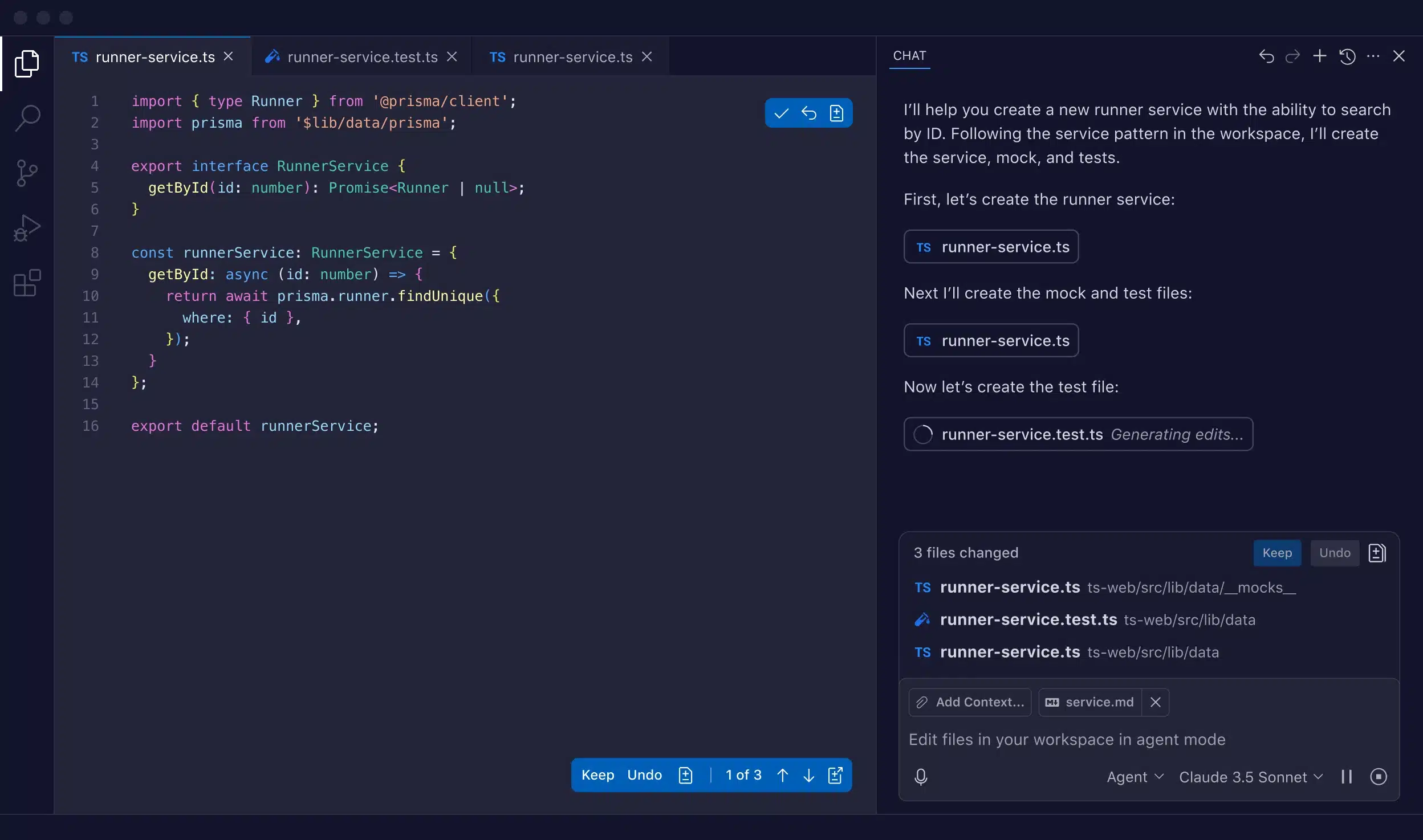
Source: GitHub
Considerations for choosing AI code review tools
Selecting the right AI code review tool involves more than comparing features. Teams must consider how the tool fits into their workflow, aligns with their security posture, and supports their programming ecosystem. The following are key considerations to guide decision-making:
- Integration: The tool should connect seamlessly with your version control system, CI/CD pipeline, and IDE. Smooth integration ensures developers receive feedback without changing their usual workflow.
- Specific needs: Match the tool’s strengths to your primary review goals—whether that’s detecting security vulnerabilities, improving performance, or enforcing maintainability standards.
- Cost: Consider licensing models, including per-user fees, repository-based pricing, or enterprise packages. Factor in long-term scalability and potential hidden costs for advanced features.
- Learning curve: Evaluate how quickly your team can adopt the tool. A shorter onboarding time increases early adoption and reduces disruption to ongoing development.
- Code focus: Identify whether your reviews target high-impact, performance-critical hot paths or mostly glue code. This determines whether you need deep performance analysis, maintainability checks, or a balance of both.
- Developer trust: Gauge how comfortable your team is with automation. If there’s resistance, choose tools with explainable outputs, low false-positive rates, and the ability to justify suggestions clearly.
- Noise reduction: Assess if the tool can learn from past reviews and adapt to your team’s coding style, reducing repetitive or irrelevant findings over time.
- Workflow compatibility: Confirm that the tool integrates with your existing pull request and review processes instead of requiring disruptive new steps.
- Domain-specific rules: Ensure the tool supports customization for your product’s unique security, compliance, or business logic requirements.
Conclusion
AI-assisted code review can be a force multiplier for software quality, but only if it complements both the technical demands of the codebase and the human factors of the team. The most effective tools balance accuracy with adaptability, automate without overstepping, and integrate seamlessly into established workflows, enhancing the review process rather than replacing it. When chosen well, they help teams catch more issues earlier, maintain higher standards, and move faster with greater confidence.